Simple Image Cropping with Flex
Here is a simple, pure as3, image cropper I wrote for Flex. I’ll try do a post later in the week describing how to use it in Flash cs3 and cs4.
[kml_flashembed publishmethod=”static” fversion=”9.0.0″ useexpressinstall=”true” replaceId=”flex_image_crop” movie=”/apps/flex_image_crop/bin-debug/main.swf” width=”640″ height=”458″ targetclass=”flashmovie”]
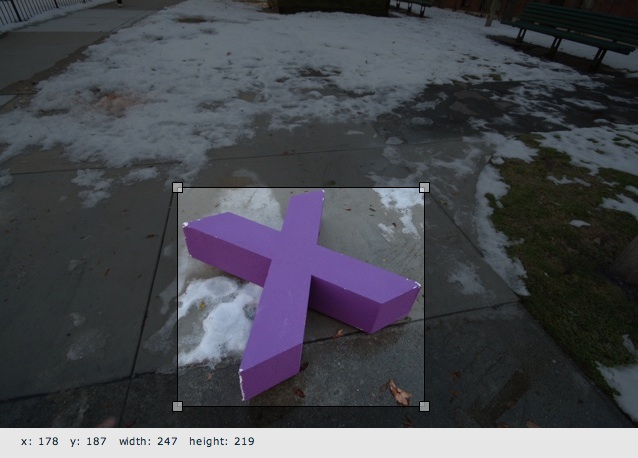
[/kml_flashembed]
Features:
- Very Simple
- Allows you to set min and max values for height and width
- Holding shift key keeps aspect ratio
You currently have to do the cropping on your own, either in flash or server side. I will followup later with examples of how to do that.
To embed this into you application, all you have to do is:
import com.wirelust.imagecrop.ImageCrop;
import com.wirelust.imagecrop.CropBox;

private var imageCrop:ImageCrop = new ImageCrop();
private function onCreationComplete():void {
imageCrop.loadImage("demo1.jpg");

// imageBox is an mx:HBox in my mxml
imageBox.addChild(imageCrop);

var crop:CropBox = imageCrop.cropBox;

// Set up the initial crop
crop.cropX = 178;
crop.cropY = 187;
crop.cropWidth = 249;
crop.cropHeight = 219;
}
You can then listen for CropBox.EVENT_CHANGED to get the dimensions of the box as it changes:
private function onCreationComplete():void {
    // snipped ...</code>
    crop.addEventListener(CropBox.EVENT_CHANGED, onCropChanged);
}

private function onCropChanged(event:Event):void {
    if (imageCrop.cropBox != null) {
        xValue.text = imageCrop.cropBox.cropX.toString();
        yValue.text = imageCrop.cropBox.cropY.toString();
        widthValue.text = imageCrop.cropBox.cropWidth.toString();
        heightValue.text = imageCrop.cropBox.cropHeight.toString();
    }
}
